


Office space planning metrics are how real estate and workplace teams move from broad assumptions to defensible decisions on consolidations, right-sizing, space mix changes, and lease renewals.
By the end of this article, you'll know which metrics to track, how to collect reliable data across your portfolio, and how to translate occupancy signals into specific decisions about space mix, capacity, and cost.
We look at:
- Capacity usage, peak demand, and active vs. passive usage
- Shortage risk, surplus risk, and employee experience risk
- How to pair metrics so single numbers don't mislead you
- Data collection methods and reporting cadence
- Translating metrics into space mix and portfolio decisions
Ready to move beyond averages?
See how unifying the analysis of your occupancy data turns space information into confident planning decisions.
What Are Office Space Planning Metrics?
Office space utilization metrics reveal how your workplace is actually used versus how it’s designed. They show utilization, peak demand, and employee experience risk. Corporate real estate and workplace teams use them to answer the hard questions: Do we consolidate? Where do we redesign? Can this floor support next quarter’s headcount?
The real value is defensibility. You're not defending a decision on instinct or one source of data. You're pointing to specific patterns in when and where space actually runs short.
The problem is that no single data source tells the full story. Wi-Fi shows building-level attendance. Badge data shows who came in. Booking systems show what people intended to use. But none of it alone shows where your teams actually worked, where they got stuck, or where capacity breaks.
Combine those signals and the picture clarifies:
- Sensors capture actual space usage by type (desks, meeting rooms, focus areas)
- Wi-Fi validates overall attendance patterns
- Bookings reveal the gap between what people intended and what actually happened
That’s when workplace leaders stop guessing and start making informed decisions.
Core Office Space Planning Metrics to Track
The metrics below cover three things: how much space is being used, when and where demand exceeds supply, and whether employees can actually find what they need when they come in.
1. Capacity Usage/Utilization Rate
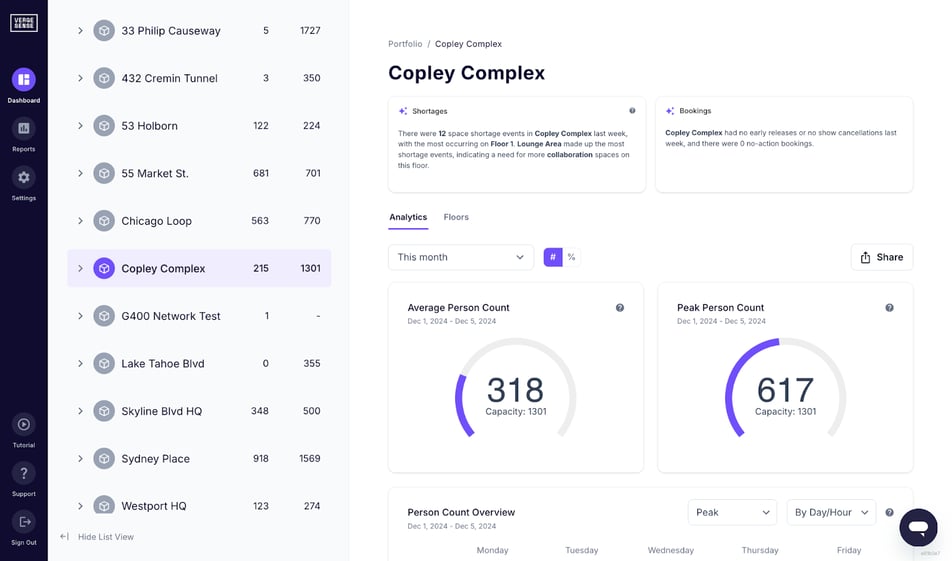
This is the average percentage of designed capacity occupied over a given period: (observed occupancy ÷ total available seats) × 100. Example: A floor with 200 desks averaging 120 people daily runs at 60% utilization.
The trap is treating this metric in isolation. A floor showing 55% average capacity usage looks healthy until you check peak windows.
- Low average + low peaks = right-sizing opportunity
- Low average + high peaks = scheduling or space mix problem
Always pair the average utilization with peak metrics, as averages can hide the moments that matter most, like a regular midweek crunch where collaboration spaces hit capacity even though overall floor utilization remains fine.
2. Peak vs. Average Occupancy
Building off that last point, comparing average attendance to your busiest hours can help you get a clearer picture of what’s happening in your space. Example: 50% space utilization rate on average sounds fine. Then Tuesday through Thursday hit 85% from 10 a.m. to 3 p.m. That’s when employees can’t find space.
The different spreads signal:
- Narrow gap (45% avg, 55% peak) = steady, predictable demand
- Wide gap (40% avg, 80% peak) = spiky demand where specific windows create pressure
This pairing separates “space looks fine on paper” from “employees can’t work effectively when they’re in-office.”
3. Active vs. Passive Usage
Not all occupied space is working space. A six-person conference room with one person on a laptop is technically occupied but functionally wasted. Passive occupancy or usage refers to when a space is being occupied by bags, jackets, or laptops, but is not being actively used by a person.
For functional purposes, however, the space is still in use and not available for active work. This is why employees say “there’s never a room available” even when utilization dashboards suggest plenty of available space.
How to use it:
- Track active vs. passive usage alongside shortage risk
- High passive usage + rising shortage risk = space is misconfigured, not undersized
- Decision shifts from “add more rooms” to “redesign the mix” or “enforce better desk booking policies”
4. Space Shortage Risk
Shortage risk forecasts when demand will exceed functional capacity for critical spaces like enclosed collaboration rooms and focus booths
Utilization shows what happened. Shortage risk tells you what's coming. A floor at 60% average utilization can still run out of the right spaces at the wrong times.
Use it to:
- Prioritize space allocation changes
- Identify neighborhoods needing capacity relief before shortages become recurring
5. Space Surplus Risk
Where is demand consistently well below what a space can support? This metric separates underutilized but necessary spaces from surplus capacity.
A conference room at 25% average utilization sounds underused. But if it hits 80% during peak hours, it's not surplus space. You need to be able to accommodate both the average and the peak.
High surplus risk means demand stays 30%+ below capacity even at peaks. That's a right-sizing opportunity, an especially valuable metric during lease renewals or downsizing, where you shift the conversation from “utilization is low” to “we're paying for capacity employees don't need.”
6. Capacity Wasted Due to Layout
Not all capacity problems stem from the same issues. A floor with 200 seats and 120 people might still create friction if the design distribution is wrong: 180 open desks and 20 enclosed focus rooms when teams need quiet space at peak hours.
This metric measures the designed capacity sitting idle because the space mix doesn’t match how people work.
What it reveals:
- Overbooked conference rooms + empty desks = space mix problem, not headcount problem
- Persistent shortage of one space type + surplus in another = space efficiency problem
These problems are fixable without adding square footage, making space mix optimization your fastest ROI lever.
7. Employee Experience Risk
While average or peak utilization are portfolio or floor-level metrics, experience risk is a people metric. It captures the likelihood that an employee walks in and can’t find what they need, even on a day when the floor isn’t close to full.
Example: A floor at 55% average utilization can still generate high experience risk if demand is mismatched with supply. Desks sit empty while every phone booth is claimed, and people hunt for quiet rooms.
To read it:
- High occupancy + low experience risk = space mix is working
- High occupancy + high experience risk = at or past functional capacity, even if the building isn't technically full
- Low occupancy + high experience risk = a space mix problem, not an attendance problem
Most organizations estimate this through surveys, anecdotal complaints, or observation. But it’s now possible to quantify it directly, modeling how your specific workforce is likely to use a floor and calculate what percentage of employees are at risk of not finding what they need on a given day. That shifts experience risk from a gut feeling to a planning input.
8. Most Densely Populated Hour/Peak Demand Window
This metric allows you to identify the specific hour or 2-3 hour window when occupancy peaks.
Example: 45% average utilization across the week. But Tuesday and Wednesday hit 85% between 10 a.m. and 1 p.m. That's when the workplace actually runs out of functional capacity.
Why it matters:
- Shows when and where space pressure actually shows up
- Informs decisions about space mix, scheduling policies, and capacity buffers
- If conference rooms hit 90% between 10 a.m. and noon but sit empty after 3 p.m., the problem isn't total room count. Everyone needs the same resource at the same time.
Why Single Metrics Mislead
Single metrics often obscure the real context. A floor at 60% utilization looks fine until you layer in shortage risk and see that enclosed collaboration spaces run out every Tuesday. To make defensible decisions, pair these metrics:
- Utilization + Shortage Risk: Whether a space is merely busy or actually failing
- Peak vs. Average Capacity Usage: Whether demand is spiky or consistently high
- Surplus Risk + Capacity Wasted Due to Layout: Whether you have too much space or simply the wrong configuration
- Occupancy + Employee Experience Risk: Whether attendance is still compatible with a functional workplace
How To Collect Data and Calculate Office Space Planning Metrics
Reliable metrics depend on the right data sources and a framework that tracks portfolio, floor, and individual space-level metrics.
For a complete picture of occupancy trends, it’s best to leverage a combination of data sources.
- Occupancy sensors provide the most accurate, privacy-safe view of actual space usage across desks, meeting rooms, and collaboration areas.
- Wi-Fi analytics offer building- and floor-level attendance trends, but can't distinguish between space types.
- Badge data shows entry and exit patterns and validates overall attendance, but doesn't reveal how people move through neighborhoods or which spaces they occupied.
- Booking systems tell you what people intended to use, not what they actually occupied. Useful for comparing demand signals to real behavior, but unreliable alone.
Set 4-8 weeks of normal operations as your baseline. This becomes the reference point for shortage risk, capacity waste, and experience risk.
A 70% utilization number without context means nothing. You need to know if it's moving. You also need benchmarks. The 9th Edition of the Workplace Occupancy & Utilization Index covers 200M+ sq. ft. across 50+ countries, so you can see how your metrics stack up against real workplace data.
Data Collection Methods and Technology Requirements
Each data source has blind spots:
- Occupancy sensors: Highest accuracy for space-type measurement (desks, meeting rooms, focus areas). Coverage limited to deployed spaces; requires hardware investment.
- Wi-Fi analytics: Quick building-level rollout. Shows overall attendance trends, but can't distinguish which spaces people actually occupied.
- Badge data: Validates overall headcount and entry patterns. Doesn't show where people worked or whether they found what they needed.
- Booking systems: Shows intended use and reveals gaps between demand and reality (ghosted meetings, last-minute changes). Misses unbooked or ad hoc space use.
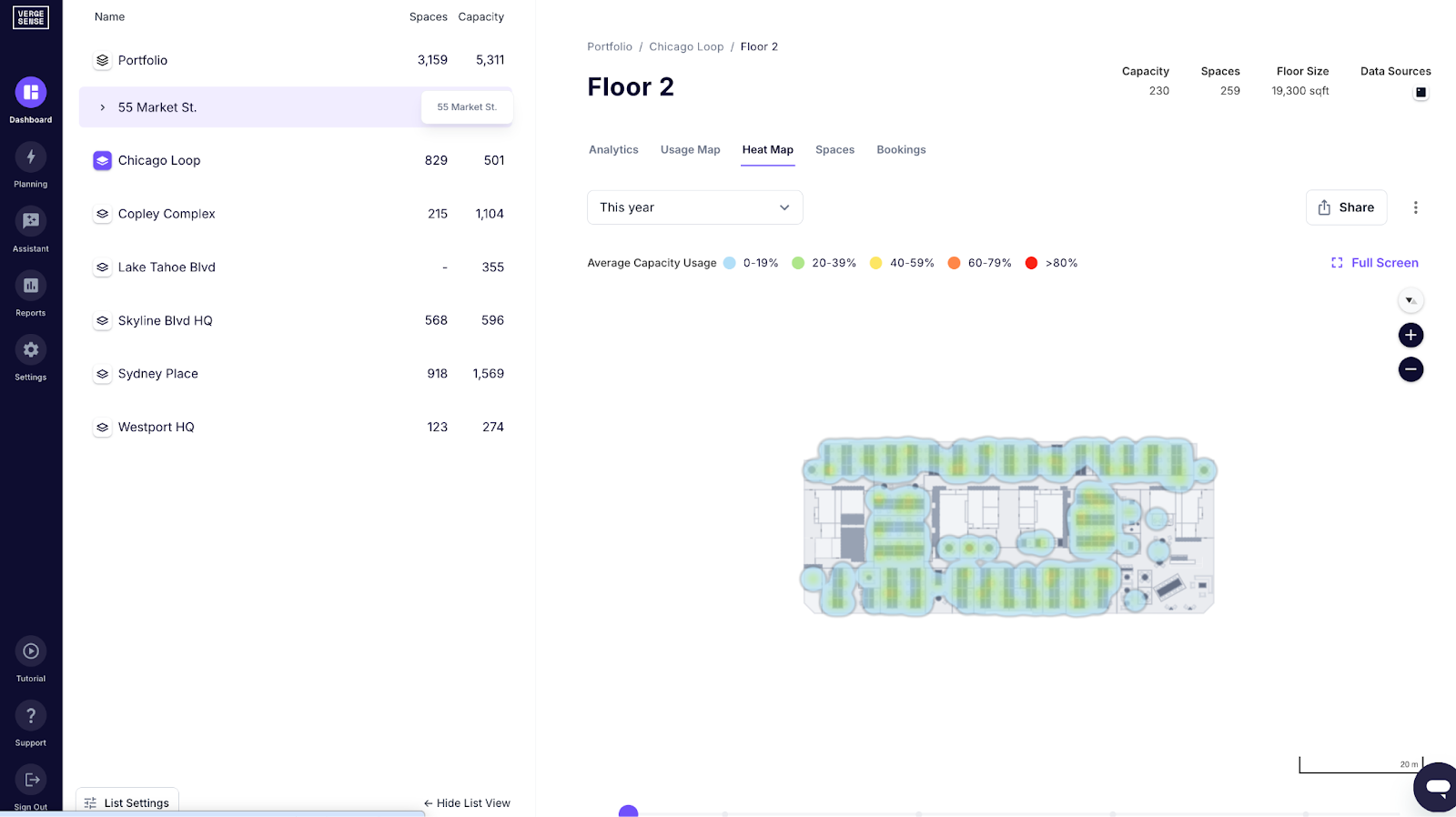
You need both macro and micro views. Building-level data tells you headcount. Floor-level shows distribution. But neighborhood and space-type data reveal the mismatches that create friction.
Example: A floor at 60% overall utilization looks fine. Zoom in, and you see huddle rooms at 95% while 8-person conference rooms sit at 30%. That gap drives employee needs going unmet, but stays invisible at the macro level.
Most teams pull data from disconnected systems (sensors in one place, Wi-Fi in another, bookings in a third). Metrics end up inconsistent, and gaps appear. Unified occupancy intelligence platforms let you measure once and segment by building, floor, neighborhood, or space type. Your metrics stay consistent across the portfolio.
Setting up Measurement Frameworks and Reporting Cycles
Picking metrics is straightforward. Collecting, standardizing, and reporting them consistently is where most teams lose time unless they have a platform that does it for them.
Regardless of tooling, a consistent reporting cadence is what turns metrics into decisions. Structure it around three time horizons:
- Weekly: Spot peaks, shortages, and emerging issues
- Monthly: Executive readouts tied to specific decisions (consolidate, reallocate, rebalance)
- Quarterly/Annual: Scenario modeling for lease renewals, headcount shifts, policy changes
The same questions come up every month: "Where is peak occupancy widening?" "Which floors are consistently underutilized?" "When do shortages cluster?" Automated summaries that flag these patterns keep your team out of spreadsheets and moving toward decisions.
Most teams get actionable insights within 4-6 weeks of deployment.
Using Office Space Planning Metrics to Optimize Your Workplace
Metrics matter because they answer specific questions: which floors to consolidate, which space types to convert, and where to cut friction without overbuilding for averages.
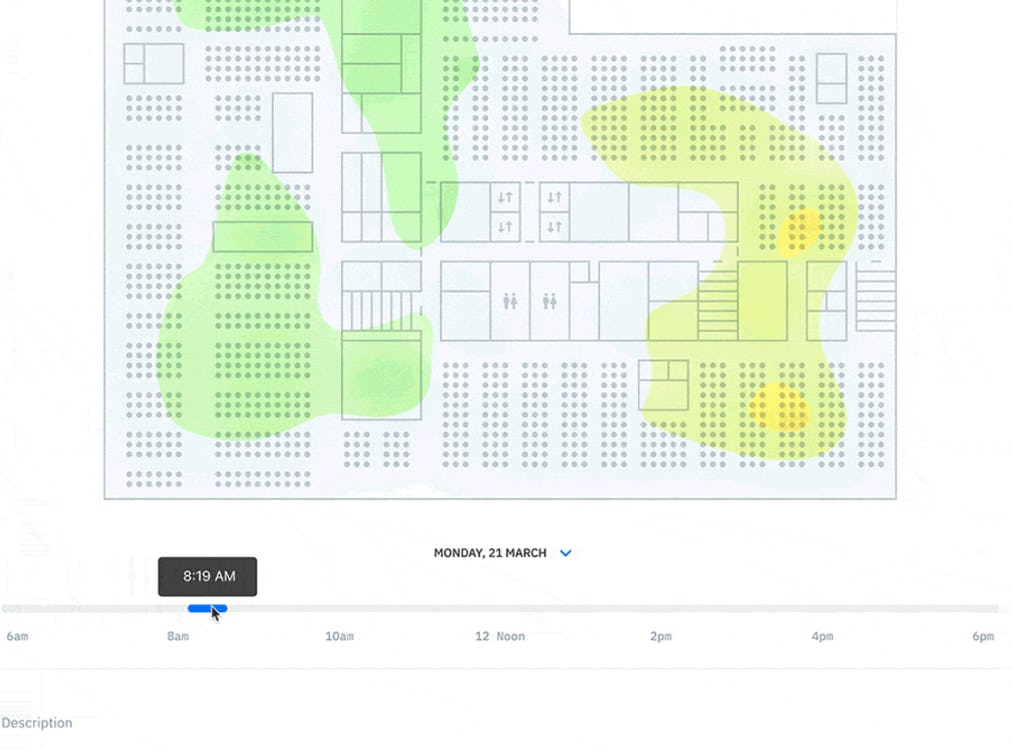
Start by segmenting: building, floor, neighborhood, space type. You avoid blunt cuts like "close Floor 3." Instead, you see the real issue: too many desks, not enough meeting rooms.
A space at 30% average looks like a cut. Peak windows say otherwise. If that same space hits 85% during Tuesday-Thursday core hours, that's a mix problem or a timing problem, not a space problem.
Identifying Underutilized Areas and Right-Sizing Opportunities
Use Space Surplus Risk to identify areas where demand consistently runs well below designed capacity. But don't stop at the average.
Start by pairing surplus metrics with Peak vs. Average Occupancy. A conference room at 15% average looks like a clear reallocation candidate. But if it hits 80% during your busiest hours, you're looking at mis-timed use, not true surplus.
Segment to find the real problem:
- Building level: Overall occupancy and trends
- Floor level: Where demand concentrates
- Neighborhood level: Micro-patterns (which zones are underused, which are packed)
- Space type level: Whether desks sit empty while meeting rooms are overbooked
A floor at 45% average might still need all its space if peaks hit 85%.
Once you've confirmed true underuse (low averages and peaks, week after week), you have options:
- Reallocate the space to higher-demand areas or space types
- Close or consolidate if demand truly doesn't justify the footprint
- Repurpose it into a space type that's actually needed (open desks to focus rooms, for example)
Multi-level views let you right-size with precision. You see exactly which neighborhoods are underutilized and which space types are genuinely excess. Space management software and scenario modeling tools help you compare outcomes: reallocate desks from Floor 3 to Floor 2, or convert open collaboration into focus rooms.
ROI projections show the financial impact, including cost savings and operating expenses, before commitment.
Improving Space Mix Based on Usage Patterns
If conference rooms are fully booked every Tuesday through Thursday while shared spaces sit empty, you don’t have a utilization problem. You have a space mix problem.
Space mix mismatch is simple. Your teams need one thing, but you built another.
Compare demand patterns across space types: desks, enclosed meeting rooms, open collaboration areas, focus rooms, phone booths. Look for persistent imbalances:
- One space type is consistently oversubscribed during peak windows
- Another runs below 30% even at its busiest
- Shortage Risk is high in one type while Surplus Risk is high in another
Layer in Employee Experience Risk. If occupancy is high and experience risk is also high, your space mix isn't working. Employees can't find what they need even though seats exist.
You have four levers:
- Convert underused open collaboration into enclosed meeting rooms
- Resize large conference rooms into smaller huddle spaces
- Redistribute desks from quiet floors to high-demand neighborhoods
- Repurpose training rooms into bookable focus space
The goal is reducing friction when it matters most, not hitting 80% everywhere.
Best Practices for Office Space Planning Metrics Programs
Agreeing on the right metrics turns occupancy signals into defensible decisions. Success comes down to how you structure measurement, reporting, and stakeholder buy-in.
Begin with 2-3 representative floors, ideally a mix of high-traffic and suspected underutilized areas. This validates data quality before you expand. Most teams get insights worth sharing within 4-6 weeks, which helps build executive support as you scale.
Different groups care about different outcomes:
- Real estate leaders care about cost per square foot and lease flexibility
- Facilities teams need to know where service demand is spiking
- HR and workplace experience teams want to reduce friction for employees
- Finance wants to understand portfolio optimization ROI
Show each group how metrics answer their questions. Support builds faster that way. Organizations like Takeda and Autodesk have used occupancy data to drive portfolio decisions, from consolidation to space mix optimization.
Three pitfalls to avoid:
- Relying on averages only. A floor at 40% average can still run out of conference rooms every Tuesday afternoon. Always pair averages with peaks and shortage signals.
- Inconsistent space type definitions. If one building counts focus rooms as meeting space and another counts them as desks, your numbers won't mean anything. Use the same definitions for space types in every location..
- Single-source bias. Badge data shows who came on-site. It doesn’t show where they worked or what they found. Combine multiple sources, or your metrics will have blind spots.
Translate metrics into business impact for executives. Don't just report "Floor 3 is 35% utilized." Say instead: "Floor 3 costs $1.2M annually and supports 42 people on average. Consolidating to Floor 2 saves $950K while maintaining peak capacity."
Pick what matters to leadership: cost, experience, sustainability, or productivity. Automated summaries flag what changed and why it matters, so you're not manually slicing dashboards every month.
Start Measuring Your Office Space Planning Metrics Today
Office space planning metrics are how you make defensible real estate decisions. Averages alone will mislead you.
Overbooked meeting rooms and empty desks don't mean you have enough capacity. A floor at 50% average can still run out of collaboration rooms on Tuesday and Thursday. You can fix that by reallocating space rather than expanding.
Unified measurement means your metrics are comparable across buildings, floors, and space types, so you can see where problems actually live rather than averaging them away.
Before acting, show leadership the financial impact, peak capacity, and employee experience implications side by side. One utilization number won't get a lease decision approved, but the full picture will.
Ready to make defensible decisions?
See how unified measurement and scenario modeling reveal the real story in your space data.